
Download Zoho Calendar – Calendar App, Zoho CRM, Zoho Projects
Overview
Zoho Calendar is a web-based calendaring application designed to help users schedule, manage, and track appointments, meetings, birthdays, and other important dates. As part of the broader Zoho ecosystem, it serves as a central hub for time management across multiple productivity tools. The software enables seamless collaboration by allowing users to share calendars, send invitations, and integrate with other Zoho applications such as Zoho CRM, Zoho Projects, and Zoho Recruit. Its primary purpose is to streamline event planning and improve team coordination through unified calendar visibility.
Target users include professionals, remote teams, small businesses, and individuals who rely on digital scheduling tools for daily operations. The platform supports real-time updates and cross-device accessibility through a browser, making it ideal for users who require consistent access to their schedules regardless of location. Use cases range from personal task tracking to managing client meetings, team deadlines, and collaborative project timelines. The integration with Zoho’s suite of business tools enhances workflow continuity, allowing users to convert events into tasks, notes, or meetings directly within the calendar interface.
Key Features & Capabilities
- Event Reminders: Users can set multiple reminders for any event, choosing delivery via email, pop-up notifications, or both. Reminders can be scheduled up to 90 days before or after the event start time, ensuring timely awareness of upcoming commitments.
- Calendar Embedding: The platform allows users to publish their calendar on websites or blogs. Privacy settings can be customized to show only free/busy status or full event details, with optional appointment request functionality for visitors.
- Integration with Zoho Apps: Events created in Zoho Calendar can be saved as notes, converted into tasks, or scheduled as meetings within Zoho CRM, Zoho Projects, and other connected tools. This creates a unified workflow across the Zoho ecosystem.
- Calendar Sharing & Permissions: Calendars can be shared with individuals or made publicly accessible. Access levels include viewing free/busy information, viewing event details, editing events, or full management rights. Unauthorized access can be revoked by resetting the private URL.
- Invitation System: Users can send invitations directly from the calendar interface. Invitees receive email notifications and can respond to confirm, decline, or tentatively accept, with their availability status updated in real time.
User Interface, Workflow & Performance
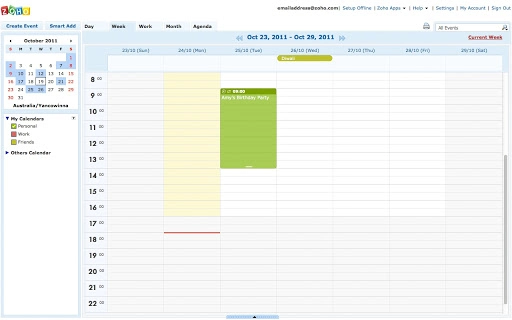
The user interface of Zoho Calendar is designed for clarity and ease of navigation, featuring a clean layout with day, week, month, and agenda views. Users can switch between views seamlessly to suit their planning needs. Navigation is intuitive, with drag-and-drop functionality for moving events and quick-access menus for adding new entries or managing settings.
Workflow efficiency is enhanced through integration with other Zoho applications, allowing users to initiate actions such as creating tasks or notes directly from event details. The platform operates entirely in the browser, eliminating the need for local installation. While specific performance metrics such as CPU or RAM usage were not provided, the web-based nature suggests reliance on browser performance and internet connectivity. Stability is expected to be consistent with standard web applications, though actual behavior may vary based on network conditions and device capabilities.
Compatibility & System Requirements
Zoho Calendar is a web-based application, meaning it runs through any modern web browser on various operating systems. It does not require installation on a specific device, making it accessible across Windows, macOS, Linux, and mobile platforms via browser support. The application size is listed as 1.2 MB, indicating minimal resource overhead during operation.
Exact system requirements were not listed by the developer. However, compatibility is expected with current versions of popular browsers such as Chrome, Firefox, Safari, and Edge. Users are advised to ensure their browser is up to date for optimal functionality. No specific hardware requirements were provided, and the application does not depend on dedicated software installations.
Pros and Cons
Pros
- Free to use with no hidden costs
- Seamless integration with Zoho’s suite of productivity tools
- Flexible reminder system with customizable delivery options
- Ability to embed calendars on websites with privacy controls
- Real-time collaboration and invitation management
Cons
- No native desktop application available (web-only)
- Limited offline functionality
- Dependent on stable internet connection
- Some advanced features may require additional Zoho subscriptions
- Interface may feel less polished compared to dedicated desktop calendar apps
FAQ Section
Is Zoho Calendar available for desktop?
Zoho Calendar is a web-based application accessible through any modern browser. While there is no dedicated desktop installer, users can add the calendar to their desktop as a web app for easier access.
Can I use Zoho Calendar without a Zoho account?
Yes, users can access Zoho Calendar through a web browser, but a free Zoho account is required to create and manage calendars and events.
Is Zoho Calendar secure?
Zoho Calendar employs standard web security practices, including encrypted connections and user authentication. Access to shared calendars can be controlled via permissions and private URLs.
How often does Zoho Calendar receive updates?
Updates are regularly released by Zoho Corporation to improve functionality, fix bugs, and enhance security. The latest version, 2023.11.07, was released on November 7, 2023.
Can I use Zoho Calendar offline?
As a web-based application, Zoho Calendar requires an active internet connection. Offline usage is not supported, though users may benefit from browser caching for limited functionality during brief connectivity drops.
Final Thoughts + CTA
Zoho Calendar offers a robust, free solution for individuals and teams seeking a unified, collaborative calendar experience within the Zoho ecosystem. Its deep integration with tools like Zoho CRM, Zoho Projects, and Zoho Recruit makes it a powerful choice for users already invested in Zoho’s suite of services. The ability to share calendars, send invitations, set detailed reminders, and embed calendars on websites adds significant value for both personal and professional use.
While the lack of a native desktop app and dependency on internet connectivity are notable limitations, the web-first design ensures broad accessibility and real-time synchronization. For users prioritizing seamless cross-application workflows and cost-effective productivity tools, Zoho Calendar stands out as a reliable and feature-rich option.
Download Zoho Calendar now







